

[Apr 28, 2025] Get New MD-102 Certification – Valid Exam Dumps Questions
100% Passing Guarantee - Brilliant MD-102 Exam Questions PDF
Microsoft MD-102 Exam Syllabus Topics:
| Topic | Details |
|---|---|
| Topic 1 |
|
| Topic 2 |
|
| Topic 3 |
|
| Topic 4 |
|
NEW QUESTION # 57
You have a Microsoft 365 E5 subscription that contains 500 macOS devices enrolled in Microsoft Intune.
You need to ensure that you can apply Microsoft Defender for Endpoint antivirus policies to the macOS devices. The solution must minimize administrative effort.
What should you do?
- A. Install Defender for Endpoint on the macOS devices.
- B. Onboard the macOS devices to the Microsoft Purview compliance portal.
- C. From the Microsoft Intune admin center, create a configuration profile.
- D. From the Microsoft Intune admin center, create a security baseline.
Answer: A
Explanation:
To apply Microsoft Defender for Endpoint antivirus policies to the macOS devices, you need to install Defender for Endpoint on the devices. You can use Intune to deploy a script that installs Defender for Endpoint on macOS devices. After installation, you can use Intune to create and assign antivirus policies to the devices. References:
https://docs.microsoft.com/en-us/windows/security/threat-protection/microsoft-defender-atp/mac-install-with-int
NEW QUESTION # 58
You have a Microsoft 365 subscription that contains 1,000 Windows 11 devices enrolled in Microsoft Intune.
You plan to create and monitor the results of a compliance policy used to validate the BIOS version of the devices.
Which four actions should you perform in sequence? To answer, move the appropriate actions from the list of actions to the answer area and arrange them in the correct order.
Answer:
Explanation:
Explanation:
NEW QUESTION # 59
You have a Microsoft 365 subscription that contains the devices shown in the following table.
You plan to enroll the devices in Microsoft Intune.
How often will the compliance policy check-ins run after each device is enrolled in Intune? To answer, select the appropriate options in the answer area.
NOTE: Each correct selection is worth one point.
Answer:
Explanation:
Explanation:
Box 1: Every three minutes for 15 minutes, then every 15 minutes for two hours, and then around every eight hours If devices recently enroll, then the compliance, non-compliance, and configuration check-in runs more frequently. The check-ins are estimated at:
Windows 10: Every 3 minutes for 15 minutes, then every 15 minutes for 2 hours, and then around every 8 hours Graphical user interface, text, application, email Description automatically generated
Box 2: Every 15 minutes for one hour, and then every eight hours
iOS/iPadOS: Every 15 minutes for 1 hour, and then around every 8 hours
Reference: https://docs.microsoft.com/en-us/mem/intune/configuration/device-profile-troubleshoot
NEW QUESTION # 60
You have a Microsoft 365 ES subscription that uses Microsoft Intune.
You have the apps shown in the following exhibit.

Answer:
Explanation:
NEW QUESTION # 61
You have a Microsoft 365 subscription that contains a user named User1. User! is assigned a Windows 10/11 Enterprise E3 license. You use Microsoft Intune Suite to manage devices. User1 activates the following devices:
* Device1: Windows 11 Enterprise
* Device2: Windows 10 Enterprise
* Device3: Windows 11 Enterprise
How many more devices can User1 activate?
- A. 0
- B. 1
- C. 2
- D. 3
Answer: A
Explanation:
https://learn.microsoft.com/en-us/windows/deployment/windows-subscription-activation#licenses
NEW QUESTION # 62
You have a Hyper-V host. The host contains virtual machines that run Windows 10 as shown in following table.
Which virtual machines can be upgraded to Windows 11?
- A. VM2 and VM3 only
- B. VM2 only
- C. VM1 only
- D. VM1.VM2. andVM3
Answer: A
Explanation:
Windows 11 has certain hardware requirements that must be met in order to upgrade from Windows 10. Some of these requirements are as follows:
A processor with at least 1 GHz clock speed and 2 cores.
A system firmware that supports UEFI and Secure Boot.
A Trusted Platform Module (TPM) version 2.0 or higher.
At least 4 GB of system memory (RAM).
At least 64 GB of storage space.
In this scenario, the virtual machines that run Windows 10 have the following specifications:
VM1 is a generation 1 virtual machine with no virtual TPM, 4 virtual processors, and 16 GB of memory.
VM2 is a generation 2 virtual machine with a virtual TPM, 2 virtual processors, and 4 GB of memory.
VM3 is a generation 2 virtual machine with a virtual TPM, 1 virtual processor, and 8 GB of memory.
VM1 cannot be upgraded to Windows 11 because it does not have a virtual TPM and it is not a generation 2 virtual machine. Generation 1 virtual machines do not support UEFI and Secure Boot, which are required for Windows 11. VM2 and VM3 can be upgraded to Windows 11 because they have a virtual TPM and they are generation 2 virtual machines. They also meet the minimum requirements for processor speed, cores, memory, and storage space.
NEW QUESTION # 63
Your network contains an on-premises Active Directory domain that contains the locations shown in the following table.
In Microsoft Intune, you enroll the Windows 10 devices shown in the following table.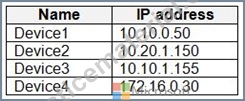
You have a Delivery Optimization device configuration profile applied to all the devices. The profile is configured as shown in the following exhibit.
From which devices can Device1 and Device2 get updates? To answer, select the appropriate options in the answer area.
NOTE: Each correct selection is worth one point.
Answer:
Explanation:
NEW QUESTION # 64
You have an Azure AD tenant and 100 Windows 10 devices that are Azure AD joined and managed by using Microsoft Intune.
You need to configure Microsoft Defender Firewall and Microsoft Defender Antivirus on the devices. The solution must minimize administrative effort.
Which two actions should you perform? Each correct answer presents part of the solution.
NOTE: Each correct selection is worth one point.
- A. To configure Microsoft Defender Antivirus, create a device configuration profile and configure the Device restrictions settings.
- B. To configure Microsoft Defender Firewall, create a device configuration profile and configure the Endpoint protection settings.
- C. To configure Microsoft Defender Firewall, create a Group Policy Object (GPO) and configure Windows Defender Firewall with Advanced Security.
- D. To configure Microsoft Defender Antivirus, create a device configuration profile and configure the Endpoint protection settings.
- E. To configure Microsoft Defender Firewall, create a device configuration profile and configure the Device restrictions settings.
- F. To configure Microsoft Defender Antivirus, create a Group Policy Object (GPO) and configure the Windows Defender Antivirus settings.
Answer: B,D
Explanation:
To configure Microsoft Defender Firewall and Microsoft Defender Antivirus on Azure AD joined devices that are managed by Intune, you need to create a device configuration profile and configure the Endpoint protection settings. You can use this profile to configure various settings for firewall and antivirus protection on the devices. Reference: https://docs.microsoft.com/en-us/mem/intune/protect/endpoint-protection-windows-10
NEW QUESTION # 65
You have an Azure AD tenant that contains the users shown in the following table.
You have the devices shown in the following table.
You have a Conditional Access policy named CAPolicy1 that has the following settings:
* Assignments
o Users or workload identities: User 1. User1
o Cloud apps or actions: Office 365 Exchange Online
o Conditions: Device platforms: Windows, iOS
* Access controls
o Grant Require multi-factor authentication
You have a Conditional Access policy named CAPolicy2 that has the following settings:
Assignments
o Users or workload identities: Used, User2
o Cloud apps or actions: Office 365 Exch
o Conditions
Device platforms: Android, iOS
Filter for devices
Device matching the rule: Exclude filtered devices from policy
Rule syntax: device. displayName- contains "1"
Access controls
Grant Block access
For each of the following statements, select Yes if the statement is true. Otherwise, select No.
Answer:
Explanation:
Explanation:
A screen shot of a computer Description automatically generated with low confidence
NEW QUESTION # 66
You have a Hyper-V host. The host contains virtual machines that run Windows 10 as shown in following table.
Which virtual machines can be upgraded to Windows 11?
- A. VM2 and VM3 only
- B. VM2 only
- C. VM1 only
- D. VM1.VM2. andVM3
Answer: A
Explanation:
Windows 11 has certain hardware requirements that must be met in order to upgrade from Windows 10. Some of these requirements are as follows:
* A processor with at least 1 GHz clock speed and 2 cores.
* A system firmware that supports UEFI and Secure Boot.
* A Trusted Platform Module (TPM) version 2.0 or higher.
* At least 4 GB of system memory (RAM).
* At least 64 GB of storage space.
In this scenario, the virtual machines that run Windows 10 have the following specifications:
* VM1 is a generation 1 virtual machine with no virtual TPM, 4 virtual processors, and 16 GB of memory.
* VM2 is a generation 2 virtual machine with a virtual TPM, 2 virtual processors, and 4 GB of memory.
* VM3 is a generation 2 virtual machine with a virtual TPM, 1 virtual processor, and 8 GB of memory.
VM1 cannot be upgraded to Windows 11 because it does not have a virtual TPM and it is not a generation 2 virtual machine. Generation 1 virtual machines do not support UEFI and Secure Boot, which are required for Windows 11. VM2 and VM3 can be upgraded to Windows 11 because they have a virtual TPM and they are generation 2 virtual machines. They also meet the minimum requirements for processor speed, cores, memory, and storage space.
NEW QUESTION # 67
You have a Windows 10 device named Device! that is joined to Active Directory and enrolled in Microsoft Intune.
Device1 is managed by using Group Policy and Intune.
You need to ensure that the Intune settings override the Group Policy settings.
What should you configure?
- A. a device compliance policy
- B. a device configuration profile
- C. a Group Policy Object (GPO)
- D. an MDM Security Baseline profile
Answer: B
Explanation:
Explanation
A device configuration profile is a collection of settings that can be applied to devices enrolled in Microsoft Intune. You can use device configuration profiles to manage Windows 10 devices that are joined to Active Directory and enrolled in Intune. To ensure that the Intune settings override the Group Policy settings, you need to enable the policy CSP setting called MDMWinsOverGP in the device configuration profile. This setting will give precedence to the MDM policy over any conflicting Group Policy settings. References: [Use policy CSP settings to create custom device configuration profiles]
NEW QUESTION # 68
You have a Microsoft 365 E5 subscription.
You create a new update rings policy named Policy1 as shown in the following exhibit.
Use the drop-down menus to select the answer choice that completes each statement based on the information presented in the graphic.
NOTE: Each correct selection is worth one point,
Answer:
Explanation:
Explanation
*Updates that contain fixes and improvements to existing Windows functionality can be deferred for 30 days.
This is because the update rings policy named Policy1 has the "Quality updates deferral period (days)" setting set to 30. This means that quality updates, which include fixes and improvements to existing Windows functionality, can be deferred for up to 30 days from the date they are released by Microsoft. After 30 days, the devices will automatically install the quality updates. References:
https://docs.microsoft.com/en-us/mem/intune/protect/windows-update-for-business-configure
*Updates that contain new Windows functionality will be installed within 60 days of release.
This is because the update rings policy named Policy1 has the "Feature updates deferral period (days)" setting set to 60. This means that feature updates, which include new Windows functionality, can be deferred for up to
60 days from the date they are released by Microsoft. After 60 days, the devices will automatically install the feature updates. References:
https://docs.microsoft.com/en-us/mem/intune/protect/windows-update-for-business-configure
NEW QUESTION # 69
You have a Microsoft 365 E5 subscription that uses Microsoft Intune. You have the Windows 11 devices shown in the following table.
You deploy the device compliance policy shown in the exhibit. (Click the Exhibit tab.)
For each of the following statements, select Yes if the statement is true. Otherwise, select No.
NOTE: Each correct selection is worth one point.
Answer:
Explanation:
NEW QUESTION # 70
You have a Microsoft 365 subscription that uses Microsoft Intune.
You plan to use Windows Autopilot to provision 25 Windows 11 devices.
You need to meet the following requirements during device provisioning:
* Display the progress of app and profile deployments.
* Join the devices to Azure AD.
What should you configure to meet each requirement? To answer drag the appropriate settings to the correct requirements. Each setting may be used once, more than once, or not at all. You may need to drag the split bar between panes or scroll to view content.
NOTE: Each correct selection is worth one point.
Answer:
Explanation:
Explanation:
https://learn.microsoft.com/en-us/mem/intune/enrollment/windows-enrollment-status
NEW QUESTION # 71
You have a Microsoft 365 E5 subscription that contains the devices shown in the following table.
All devices have Microsoft Edge installed.
From the Microsoft Intune admin center, you create a Microsoft Edge Baseline profile named Edge1.
You need to apply Edge1 to all the supported devices.
To which devices should you apply Edge1?
- A. Device1, Device2, and Device3 only
- B. Device1 only
- C. Device1, Device2, Device3, and Device4
- D. Device1 and Device2 only
- E. Device1, Device2, and Device4 only
Answer: D
NEW QUESTION # 72
You have a Microsoft Entra tenant named contoso.com that contains a Windows 11 device named Device1 and a user named User1 User! registers Device1 in contoso.com.
Which capability is available to Device1 after registering in contoso.com.
- A. enforcing compliance policies
- B. enforcing hard drive encryption
- C. enforcing software updates
- D. authenticating to cloud resources by using single sign-on (SSO)
Answer: D
NEW QUESTION # 73
You have a Microsoft 365 subscription. The subscription contains computers that run Windows 11 and are enrolled in Microsoft Intune. You need to create a compliance policy that meets the following requirements:
* Requires BitLocker Drive Encryption (BitLocker) on each device
* Requires a minimum operating system version
Which setting of the compliance policy should you configure for each requirement? To answer, drag the appropriate settings to the correct requirements. Each setting may be used once, more than once, or not at all. You may need to drag the split bar between panes or scroll to view content.
NOTE: Each correct selection is worth one point,
Answer:
Explanation:
NEW QUESTION # 74
You have 200 computers that run Windows 10. The computers are joined to Microsoft Azure Active Directory (Azure AD) and enrolled in Microsoft Intune.
You need to configure an Intune device configuration profile to meet the following requirements:
* Prevent Microsoft Office applications from launching child processes.
* Block users from transferring files over FTP.
Which two settings should you configure in Endpoint protection? To answer, select the appropriate settings in the answer area.
NOTE: Each correct selection is worth one point.
Answer:
Explanation:
Explanation:
References:
https://learn.microsoft.com/en-us/mem/intune/protect/endpoint-protection-windows-10#global-settings
https://learn.microsoft.com/en-us/mem/intune/protect/endpoint-protection-windows-10#microsoft-defender-expl
NEW QUESTION # 75
You have a Microsoft 365 tenant that contains the devices shown in the following table.
The devices are managed by using Microsoft Intune.
You create a compliance policy named Policy1 and assign Policy1 to Group1. Policy1 is configured to mark a device as Compliant only if the device security settings match the settings specified in the policy.
You discover that devices that are not members of Group1 are shown as Compliant.
You need to ensure that only devices that are assigned a compliance policy can be shown as Compliant. All other devices must be shown as Not compliant.
What should you do from the Microsoft Intune admin center?
- A. From Policy1, modify the actions for noncompliance.
- B. From Endpoint security, configure the Conditional access settings.
- C. From Tenant administration, modify the Diagnostic settings.
- D. From Device compliance, configure the Compliance policy settings.
Answer: D
Explanation:
https://learn.microsoft.com/en-us/mem/intune/protect/device-compliance-get-started#:~:text=Device%20complia
NEW QUESTION # 76
You have a Microsoft 365 subscription.
You need to enable passwordless authentication for all users. The solution must meet the following requirements:
* Users in the research department cannot use mobile devices and must authenticate from unmanaged Linux devices by using an alternative method.
* To access services, users in the sales department must authenticate by using their mobile phone.
* Administrative effort must be minimized.
Which authentication method should you use for each department? To answer, select the appropriate options in the answer area.
NOTE: Each correct selection is worth one point.
Answer:
Explanation:
NEW QUESTION # 77
Your company has a Microsoft 365 subscription.
All the users in the finance department own personal devices that run iOS or Android. All the devices are enrolled in Microsoft Intune.
The finance department adds new users each month.
The company develops a mobile application named App1 for the finance department users.
You need to ensure that only the finance department users can download Appl.
What should you do first?
- A. Add App1 to a Microsoft Deployment Toolkit (MDT) deployment share.
- B. Register App1 in Microsoft Entra.
- C. Add App1 to Intune.
- D. Add App1 to the vendor stores for iOS and Android applications.
Answer: C
NEW QUESTION # 78
You have an Azure AD tenant named contoso.com that contains the devices shown in the following table.
The tenant contains the Azure AD groups shown in the following table.
You add an Autopilot deployment profile as shown in the following exhibit.
You have an Azure AD tenant named contoso.com that contains the devices shown in the following table.
The tenant contains the Azure AD groups shown in the following table.
Answer:
Explanation:
Explanation: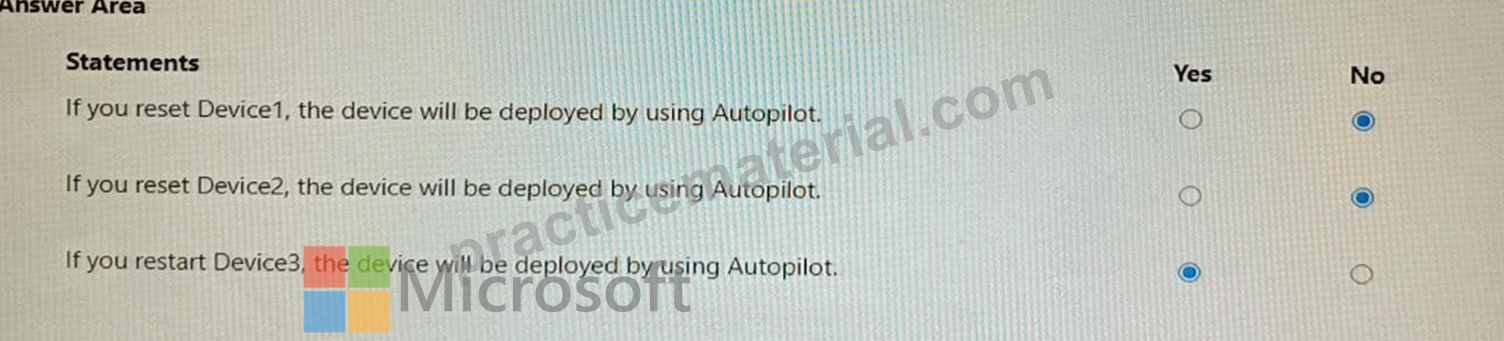
NEW QUESTION # 79
Your company standardizes on Windows 10 Enterprise for all users.
Some users purchase their own computer from a retail store. The computers run Windows 10 Pro.
You need to recommend a solution to upgrade the computers to Windows 10 Enterprise, join the computers to Azure AD, and install several Microsoft Store apps. The solution must meet the following requirements:
* Ensure that any applications installed by the users are retained.
* Minimize user intervention.
What is the best recommendation to achieve the goal?
More than one answer choice may achieve the goal.
Select the BEST answer.
- A. a Windows Configuration Designer provisioning package
- B. Microsoft Deployment Toolkit (MDT)
- C. Windows Deployment Services (WDS)
- D. Windows Autopilot
Answer: A
NEW QUESTION # 80
......
Free MD-102 braindumps download: https://www.practicematerial.com/MD-102-exam-materials.html
MD-102 Dumps 2025 - NewMicrosoft Exam Questions: https://drive.google.com/open?id=1clc-VIeE2nAagzbcy-Dm1fBjkQiX1klH
