

[2026] Pass Microsoft AB-100 Exam in First Attempt Easily
The Most Efficient AB-100 Pdf Dumps For Assured Success
NEW QUESTION # 27
A company has an AI business solution.
You need to extend the solution so that Microsoft 365 Copilot can invoke external logic hosted in Azure services.
What should you include in the solution?
- A. Microsoft Copilot Studio skills
- B. Microsoft Power Platform connectors
- C. custom engine agents
Answer: B
Explanation:
To enhance an AI business solution with Microsoft 365 Copilot and integrate external logic hosted in Azure, you should use Copilot Studio to create Actions. These actions act as plugins that allow Copilot to invoke external services through Power Platform components.
Implementation Strategy
Azure Logic Hosting: Host your external logic in Azure using services like Azure Functions or Azure Logic Apps. These provide the API endpoints that Copilot will ultimately call.
*-> Power Platform Connector: Create a Custom Connector in the Power Platform to wrap your Azure service's API. This connector acts as the bridge, translating Copilot's requests into API calls your Azure logic understands.
Copilot Studio Integration: Within Microsoft Copilot Studio, add the custom connector as a Tool or Action. This makes the logic discoverable and invokable by Microsoft 365 Copilot.
Deployment: Deploy the action through the Microsoft 365 admin center under Integrated Apps to make it available to users in Teams or other Microsoft 365 apps.
Key Components
*-> Connector: Wraps the Azure API using an OpenAPI definition or Postman collection.
Plugin/Action: Defines how Copilot identifies when to use the connector based on user prompts.
Authentication: Ensure the connector is configured with appropriate security (e.g., OAuth 2.0) to safely access your Azure resources.
Reference:
https://learn.microsoft.com/en-us/copilot/security/connector-logicapp
NEW QUESTION # 28
Case Study 1 - Fabrikam, Inc
Background
Fabrikam, Inc., is a global consumer goods company that is undergoing a digital transformation initiative to migrate its entire infrastructure to the Microsoft cloud. As a key element of this cloud migration, the company will implement Microsoft Dynamics 365 Sales, moving away from the current on-premises proprietary technologies used by its business-to-business (B2B) sales team.
As part of the cloud migration, Fabrikam will adopt an AI-first approach to its business solutions and implement AI solutions, wherever possible, to streamline operations.
Problem Statements
Fabrikam's infrastructure currently relies on various on-premises systems that require sales executives to use corporate computers with physical keyboards to access business information during customer interactions. Mobile phones cannot be used for these purposes, as the systems depend on keyboard input. As a result, the sales executives spend a lot of time using keyboards to search for data on several disparate systems and file servers, rather than focusing on the customers. This affects the customer experience.
Fabrikam stakeholders are concerned that users will be hesitant to adopt AI. If the AI initiatives are NOT adopted, cost savings will never be realized. Additionally, funding for future AI initiatives will depend on demonstrating an increase in AI adoption month over month. As the AI agent initiative for the sales team will be the first for Fabrikam, the rapid adoption of the agent is a high priority.
Planned Initiatives
General
Fabrikam management has prioritized AI-driven projects to improve efficiency, customer engagement, and responsible AI adoption. The current application infrastructure is on-premises and must be migrated to the cloud to support the adoption of these technologies.
Infrastructure Migration
Fabrikam plans to migrate from its current on-premises infrastructure to a completely cloud-based topology; this will include user authentication, the security framework, and, primarily, the adoption of the services by end users.
All the data from the different systems will be consolidated into a single data source - a common data model that will use a Microsoft Dataverse environment as a single source of truth (SSOT) for the sales team.
Sales Cycle Enablement
To achieve the company's objectives, Fabrikam intends to implement the following strategies to enhance the sales cycle:
- Use low-code development to create a single AI agent that has
Dataverse as its core component.
- Ensure that sales managers can access unanswered correspondence from
prospects and intervene as appropriate.
- Replace the previous proprietary software with Dynamics 365 Sales to
track sales cycles and customer interactions.
- Have the sales executives use Dynamics 365 Sales to track
interactions for open opportunities and send follow-up communications
to prospects.
- Have the sales executives use handsfree headsets to interact with an
AI agent when they have questions about internal policies or customer
data.
Requirements
Infrastructure Migration
Fabrikam has identified the following infrastructure migration requirements:
- Azure must be used for all future infrastructure workloads.
- The company must follow Microsoft-recommended methodologies for
infrastructure migration to the cloud.
- Any created AI agents must have their return on investment (ROI)
calculated to ensure that the solution will save the company money.
Sales Cycle Enablement
Fabrikam has identified the following requirements for sales cycle enablement:
- The final AI agent must follow Microsoft recommendations for a
conversational user experience.
- A designated checklist must be reviewed to ensure that the AI agent
follows Microsoft deployment recommendations for a compliant solution.
- Detailed telemetry must be logged for the first created AI agent to
help troubleshoot and optimize the agent during the initial AI agent
adoption process.
- Unexpected AI agent actions must end in an escalation to a live
representative. For example, a sales executive must be rerouted to a
representative if the agent cannot answer a question after two failed
attempts.
- The return on investment (ROI) of switching from the current process
to the future process is required for stakeholder sign off.
- The sales team must use Dynamics 365 Sales to correspond with
prospects more quickly and efficiently than currently.
- Sales managers must report on the adoption of the AI agent to key
Fabrikam stakeholders on a monthly basis.
- Any sensitive information, such as user IDs and names, shared via the AI agent must be tracked for future auditing.
Which tool should you recommend to help secure funding for future AI agent development?
- A. Direct Preference Optimization (DPO)
- B. the Azure Cost Optimization workbook
- C. the Analytics tab in Microsoft Copilot Studio
- D. Evaluations in Microsoft Foundry
- E. Azure Operator Insights
Answer: C
Explanation:
Scenario
Requirements
Any created AI agents must have their return on investment (ROI) calculated to ensure that the solution will save the company money.
--
In a Microsoft AI migration, calculating the Return on Investment (ROI) for AI agents is essential for justifying costs and securing future funding. You can utilize the Analytics tab in Microsoft Copilot Studio to track these financial and performance metrics directly.
Calculating ROI with Copilot Studio Analytics
The Analytics tab provides a dedicated Savings tile (ROI) that allows you to quantify the impact of your agents:
Define Savings Parameters: You can input estimated time saved (in seconds, minutes, or hours) and money saved per successful agent run.
Real-Time Tracking: Total savings are calculated automatically for your selected period based on successful runs of resolved conversations.
Retroactive Application: If you update your savings estimates, the system can apply these changes to previous runs to provide an accurate historical view.
Granular Insights: Savings can be defined at the overall agent-run level or for specific tools used within a run.
Reference:
https://learn.microsoft.com/en-us/training/modules/forecast-agent-return-investment/
NEW QUESTION # 29
Note: This section contains one or more sets of questions with the same scenario and problem. Each question presents a unique solution to the problem. You must determine whether the solution meets the stated goals. More than one solution in the set might solve the problem. It is also possible that none of the solutions in the set solve the problem.
After you answer a question in this section, you will NOT be able to return. As a result, these questions do not appear on the Review Screen.
Your organization creates a new AI Center of Excellence (CoE) to guide enterprise-wide adoption of generative AI. A project team submits a proposal requesting immediate development of a generative AI model. They argue that identifying use cases and validating data quality can wait until after the prototype is built, since the CoE can "fix the data later." You are asked whether this approach aligns with Microsoft's recommended AI adoption lifecycle, which starts with identifying use cases, selecting domain-specific data, preparing and validating that data, designing and training solutions, and then monitoring and adapting them over time.
According to Microsoft's AI adoption guidance, is it appropriate to skip identifying use cases and validating domain-specific data before beginning AI model development?
- A. No
- B. Yes
Answer: A
Explanation:
Microsoft's generative AI adoption framework - as shown in the diagram - emphasizes a sequenced lifecycle:
Identify use cases
Prepare, validate, and aggregate the required data
Design, train, and validate AI solutions
Monitor and adapt
The Microsoft Learn module clearly states that a Center of Excellence ensures organizations start with aligned business use cases and validated domain-specific data before any model development begins.
Skipping these early steps introduces high risk, creates misaligned solutions, and prevents effective contextualization of AI models.
Therefore, beginning model development without first identifying use cases and validating data does not follow Microsoft's recommended AI planning and adoption process.
References:
https://learn.microsoft.com/en-us/training/modules/intro-ai-center-excellence/2-how-center- excellence-assists-planning-adoption-generative-ai
https://learn.microsoft.com/en-us/training/modules/intro-ai-center-excellence/1-introduction- generative-ai-center-excellence
https://learn.microsoft.com/en-us/azure/cloud-adoption-framework/scenarios/ai/center-of- excellence
NEW QUESTION # 30
Hotspot Question
A company deploys agents that generate responses by using Azure OpenAI resources. The agents are deployed to both the United States and Europe.
You need to recommend a governance solution that meets the following requirements:
- Enforces the deployment of the resources to only approved Azure
regions
- Provides continuous compliance verification of the resources
What should you include in the recommendation for each requirement? To answer, select the appropriate options in the answer area.
NOTE: Each correct selection is worth one point.
Answer:
Explanation:
Explanation:
Box 1: Azure Policy
Enforces the deployment of the resources to only approved Azure regions To enforce the deployment of Azure OpenAI resources to only approved Azure regions (e.g., specific regions in Europe and the USA), you should use Azure Policy with the "Allowed locations" policy definition.
Here is the breakdown of how to implement this control:
Primary Tool: Azure Policy
Azure Policy allows you to define rules that restrict where resources can be created.
Policy Rule: Use the Allowed locations policy definition.
Implementation: Assign this policy at the Subscription or Resource Group level to restrict developers to only using permitted regions (e.g., East US, West Europe).
Effect: If a user attempts to deploy an Azure OpenAI resource in a non-approved region, the deployment will be blocked.
Box 2: Microsoft Purview
Provides continuous compliance verification of the resources
To provide continuous compliance verification for Azure OpenAI resources across Europe and the USA, you should use Microsoft Purview Compliance Manager and Azure Policy.
Microsoft Purview Compliance Manager: This tool provides a risk-based compliance score and continuous monitoring against global regulations such as the EU AI Act, GDPR, and various US standards. It offers specific regulatory templates to help you assess and implement controls for generative AI applications.
Azure Policy: Use this to enforce organizational standards and assess compliance at scale. You can apply built-in policy definitions for Azure AI services to automatically audit or deny non- compliant resource configurations, such as ensuring resources are restricted to specific regions (e.g., only EU or USA) or have private network access enabled.
Reference:
https://learn.microsoft.com/en-us/azure/ai-foundry/foundry-models/concepts/deployment-types
https://learn.microsoft.com/en-us/purview/ai-agent-365
NEW QUESTION # 31
Case Study 1 - Fabrikam, Inc
Background
Fabrikam, Inc., is a global consumer goods company that is undergoing a digital transformation initiative to migrate its entire infrastructure to the Microsoft cloud. As a key element of this cloud migration, the company will implement Microsoft Dynamics 365 Sales, moving away from the current on-premises proprietary technologies used by its business-to-business (B2B) sales team.
As part of the cloud migration, Fabrikam will adopt an AI-first approach to its business solutions and implement AI solutions, wherever possible, to streamline operations.
Problem Statements
Fabrikam's infrastructure currently relies on various on-premises systems that require sales executives to use corporate computers with physical keyboards to access business information during customer interactions. Mobile phones cannot be used for these purposes, as the systems depend on keyboard input. As a result, the sales executives spend a lot of time using keyboards to search for data on several disparate systems and file servers, rather than focusing on the customers. This affects the customer experience.
Fabrikam stakeholders are concerned that users will be hesitant to adopt AI. If the AI initiatives are NOT adopted, cost savings will never be realized. Additionally, funding for future AI initiatives will depend on demonstrating an increase in AI adoption month over month. As the AI agent initiative for the sales team will be the first for Fabrikam, the rapid adoption of the agent is a high priority.
Planned Initiatives
General
Fabrikam management has prioritized AI-driven projects to improve efficiency, customer engagement, and responsible AI adoption. The current application infrastructure is on-premises and must be migrated to the cloud to support the adoption of these technologies.
Infrastructure Migration
Fabrikam plans to migrate from its current on-premises infrastructure to a completely cloud-based topology; this will include user authentication, the security framework, and, primarily, the adoption of the services by end users.
All the data from the different systems will be consolidated into a single data source - a common data model that will use a Microsoft Dataverse environment as a single source of truth (SSOT) for the sales team.
Sales Cycle Enablement
To achieve the company's objectives, Fabrikam intends to implement the following strategies to enhance the sales cycle:
- Use low-code development to create a single AI agent that has
Dataverse as its core component.
- Ensure that sales managers can access unanswered correspondence from
prospects and intervene as appropriate.
- Replace the previous proprietary software with Dynamics 365 Sales to
track sales cycles and customer interactions.
- Have the sales executives use Dynamics 365 Sales to track
interactions for open opportunities and send follow-up communications
to prospects.
- Have the sales executives use handsfree headsets to interact with an
AI agent when they have questions about internal policies or customer
data.
Requirements
Infrastructure Migration
Fabrikam has identified the following infrastructure migration requirements:
- Azure must be used for all future infrastructure workloads.
- The company must follow Microsoft-recommended methodologies for
infrastructure migration to the cloud.
- Any created AI agents must have their return on investment (ROI)
calculated to ensure that the solution will save the company money.
Sales Cycle Enablement
Fabrikam has identified the following requirements for sales cycle enablement:
- The final AI agent must follow Microsoft recommendations for a
conversational user experience.
- A designated checklist must be reviewed to ensure that the AI agent
follows Microsoft deployment recommendations for a compliant solution.
- Detailed telemetry must be logged for the first created AI agent to
help troubleshoot and optimize the agent during the initial AI agent
adoption process.
- Unexpected AI agent actions must end in an escalation to a live
representative. For example, a sales executive must be rerouted to a
representative if the agent cannot answer a question after two failed
attempts.
- The return on investment (ROI) of switching from the current process
to the future process is required for stakeholder sign off.
- The sales team must use Dynamics 365 Sales to correspond with
prospects more quickly and efficiently than currently.
- Sales managers must report on the adoption of the AI agent to key
Fabrikam stakeholders on a monthly basis.
- Any sensitive information, such as user IDs and names, shared via the AI agent must be tracked for future auditing.
Which template should you use for the AI agent to meet the requirements for the sales executives?
- A. AI agents in Microsoft Foundry
- B. IT Helpdesk in Microsoft Copilot Studio
- C. AI chat in Microsoft Foundry
- D. Voice in Microsoft Copilot Studio
Answer: D
Explanation:
Scenario:
Sales Cycle Enablement
To achieve the company's objectives, Fabrikam intends to implement the following strategies to enhance the sales cycle:
Have the sales executives use Dynamics 365 Sales to track interactions for open opportunities and send follow-up communications to prospects.
*-> Have the sales executives use handsfree headsets to interact with an AI agent when they have questions about internal policies or customer data.
To enable handsfree headset interaction with an AI agent for internal policies and customer data in Dynamics 365 Sales, you should use Microsoft Copilot Studio to create a custom agent template.
Here is the breakdown of the recommended approach and templates:
Recommended Template
Voice-enabled agent template (in Copilot Studio): This template provides the foundational, pre- configured setup for Interactive Voice Response (IVR) capabilities, allowing for natural language voice inputs and text-to-speech output.
Internal Data Knowledge Source: Within this agent, you will connect to Dataverse (for customer data) and configure Knowledge Sources (for internal policy documents).
Note:
To implement a hands-free AI agent for Dynamics 365 Sales using the Voice agent template in Microsoft Copilot Studio, follow these steps to enable voice-first interactions for internal policies and customer data.
1. Create a Voice-Enabled Agent
2. Configure Hands-Free Interaction
3. Connect to Internal Data
Reference:
https://learn.microsoft.com/en-us/dynamics365/contact-center/administer/bot-scenario-configure
NEW QUESTION # 32
A company plans to deploy an AI-based customer service app that will autonomously manage interactions, escalate complex cases, and learn from historical ticket data.
You need to perform a return on AI investment (ROAI) analysis of the app deployment. The solution must ensure that the analysis is accurate.
What should you do first?
- A. Establish the AI performance metrics.
- B. Conduct an AI market benchmarking study.
- C. Model the customer experience.
- D. Identify and quantify all the development, deployment, and operating costs.
Answer: D
Explanation:
To conduct a robust Return on AI Investment (ROAI) analysis for your Microsoft-based AI customer service application, you must first categorize and quantify three distinct cost phases:
Development, Deployment, and Operations. For a system capable of managing complex escalations and learning from historical data, your project aligns with "Advanced" or "Agentic" AI profiles.
1. Development Costs (Upfront Investment)
This phase covers the creation of the core AI logic, custom integrations, and data preparation.
2. Deployment Costs (One-Time Setup)
These are the costs to move the application from a development environment to a live production state.
3. Operating & Maintenance Costs (Recurring)
Ongoing expenses are critical for ROAI as they impact the net gain over time.
Reference:
https://emerline.com/blog/ai-app-development-cost
NEW QUESTION # 33
You are evaluating a Microsoft Copilot Studio agent that supports Microsoft Dynamics 365 Customer Service representatives.
You need to recommend a testing solution that meets the following requirements:
- Evaluates agent effectiveness during active sessions
- Validates whether the agent delivers accurate and helpful responses
- Provides measurable, actionable insights for continuous improvement
What should you recommend?
- A. Review historical tickets to find agents that have the shortest resolution times.
- B. Track resolution, deflection, and accuracy by using dashboards and use scripts to ensure consistent responses.
- C. Measure uptime and page load times.
- D. Perform load testing to validate how the agent scales under a high chat volume.
Answer: B
Explanation:
To establish a testing and evaluation setup for your Microsoft Copilot Studio agent within Dynamics 365 Customer Service, you should leverage specialized AI-driven evaluation agents and integrated analytics dashboards.
1. Evaluate Effectiveness and Accuracy
Use the Quality Evaluation Agent in Dynamics 365 to automate the assessment of agent performance during and after active sessions.
2. Track Measurable Insights with Dashboards
Utilize the built-in and customizable dashboards to monitor key performance indicators (KPIs) like resolution and deflection.
3. Ensure Consistency with Agent Scripts
To maintain uniform and company-endorsed communication, implement Agent Scripts within the Customer Service Admin center.
Reference:
https://learn.microsoft.com/en-us/dynamics365/contact-center/administer/manage-quality- evaluation-agent
NEW QUESTION # 34
A company has multiple AI models that support generation of sales transactions.
Each release of the models must be reviewed by a security and compliance team before being deployed to the production environment. The security and compliance team must have access to prior versions to properly determine potential exposures introduced.
You need to recommend a solution to evaluate the impact of each deployment to production. The solution must enhance business continuity.
What should you recommend?
- A. Establish a promotion process by using a quality gate.
- B. Implement version control for all the AI system components.
- C. Create a central model registry that uses version history.
- D. Track model retirement schedules to prevent service disruptions.
Answer: B
Explanation:
To ensure business continuity and minimize risks in AI-driven sales transaction systems, implementing comprehensive version control across all system components is a critical requirement. This provides reviewers with a stable baseline to evaluate new releases against older versions, helping identify potential exposures or regressions before they reach production.
Strategic Implementation for AI Version Control
Version All Components: Do not limit version control to application code. You must track:
*-> Models: Managed iterations including weights and architecture.
Etc.
Benefits for Business Continuity
Predictability: Standardized versioning makes AI behavior more auditable and scalable.
Disaster Recovery: Allows teams to quickly reproduce or restore any previous environment state during a failure.
Regulatory Compliance: Provides the necessary evidence of "what the AI was instructed to do" at any given point, which is mandatory for regulated financial environments.
Reference:
https://www.kore.ai/blog/why-prompt-version-control-matters-in-agent-development
NEW QUESTION # 35
A company plans to deploy a Microsoft Copilot Studio agent that will analyze historical business data to predict customer behavior.
The data is currently stored in an Azure SQL database, flat files, APIs, and logs.
You need to organize the data into a format that can be used as a knowledge source in Copilot Studio.
What should you include in the solution?
- A. Azure Data Lake Storage
- B. Azure Translator in Foundry Tools
- C. Azure AI Search
- D. Azure Cosmos DB
Answer: C
Explanation:
Microsoft Copilot Studio agents can analyze customer behavior by leveraging business data from Azure SQL, files, and APIs by using Azure AI Search as a knowledge source. By importing and vectorizing this structured and unstructured data into an Azure AI Search index, the agent can perform semantic, meaning-based searches to retrieve context-relevant information.
Reference:
https://learn.microsoft.com/en-us/microsoft-copilot-studio/knowledge-azure-ai-search
NEW QUESTION # 36
A company uses Microsoft Dynamics 365 finance and operations apps.
The company plans to use Microsoft Copilot in-app help and guidance to generate responses for internal business processes.
You need to add an additional knowledge source for the business processes. The solution must NOT add new topics to the Copilot agent for the finance and operations apps.
Which knowledge source should you add?
- A. Azure AI Search
- B. Microsoft Dataverse
- C. a public website
- D. a file upload
Answer: D
Explanation:
To add an additional knowledge source for internal business processes to the Microsoft Copilot in-app experience for Dynamics 365 finance and operations apps-without creating new topics- you should add File Uploads (such as PDF, Word, or text documents) to the "Copilot for finance and operations apps" agent in Copilot Studio.
Reference:
https://learn.microsoft.com/en-us/dynamics365/fin-ops-core/dev-itpro/copilot/extend-copilot- generative-help
NEW QUESTION # 37
You are creating validation criteria for a custom generative AI model that produces business reports based on internal enterprise data.
You need to assess whether the model's outputs are appropriate and meaningful for the business reports.
Which metric should you use?
- A. the number of active users interacting with the model
- B. the model training duration
- C. the average system resource usage during inference
- D. alignment of the output to domain-specific tasks
Answer: D
Explanation:
To validate a custom generative AI model for business reports based on internal data, you should focus on alignment with domain-specific tasks through a mix of automated and human-centric metrics.
Validation Criteria for Business Reports
*-> Task-Specific Quality Evaluation (TSQE): This is your primary metric for assessing whether outputs are meaningful for specific business tasks.
* Groundedness and Factuality: Measure the model's ability to provide information strictly referenced from your internal enterprise data. This prevents "hallucinations" that could lead to poor business decisions.
* Domain-Specific Benchmarking: Compare AI outputs against "ground truth" data-verified, accurate reports previously created by human experts.
Reference:
https://www.prompts.ai/blog/how-to-evaluate-generative-ai-llm-outputs-with-structure-and- precision
NEW QUESTION # 38
A company plans to deploy a Microsoft Dynamics 365 Contact Center agent.
You need to ensure that the agent can transfer the conversation to a live customer service representative.
Which two components should you include in the solution? Each correct answer presents part of the solution.
NOTE: Each correct selection is worth one point.
- A. Customer engagement hub
- B. Microsoft Copilot Studio
- C. Microsoft 365 Agents Toolkit
- D. Microsoft Foundry
- E. an Azure AI Bot Service skill
Answer: A,B
Explanation:
To implement a Microsoft Dynamics 365 Contact Center solution that enables seamless handoff between a virtual agent and a live representative, you must integrate Microsoft Copilot Studio with the Customer Engagement Hub (typically Dynamics 365 Customer Service or Omnichannel).
Core Components & Setup
1. Copilot Studio Configuration:
Connect to Engagement Hub: In Copilot Studio, navigate to Settings > Customer Engagement Hub and select Dynamics 365 Customer Service.
Enable Agent Transfer: Under the Channels tab, select the Dynamics 365 Customer Service tile and click Connect. This establishes the link between the bot and your live agent environment.
Configure Handoff Topic: Modify the Escalate system topic or create a custom topic. Use the Transfer conversation node to trigger the move to a live representative. You can include a private message to the agent to provide context.
2. Customer Engagement Hub (Dynamics 365) Setup:
Workstream Integration: In the Customer Service Admin Center, create or open a workstream (e.g., for Live Chat or Voice). Add your Copilot Studio agent to this workstream to ensure it is the first point of contact.
Routing Rules: Define rules to route the escalated conversation to the correct live agent queue based on context variables passed from the bot.
3. Handoff Experience:
Context Sharing: When a transfer occurs, the live representative receives the full conversation transcript and any variables collected by the bot, allowing them to resume the interaction without asking the customer to repeat information.
Agent Workspace: Live agents accept the transfer through the Customer Service Workspace or Omnichannel for Customer Service.
Reference:
https://learn.microsoft.com/en-us/microsoft-copilot-studio/customer-copilot-overview
NEW QUESTION # 39
Drag and Drop Question
You are designing two Microsoft Copilot Studio agents named Agent1 and Agent2. Each agent must meet the following requirements:
- Each agent must use a standard model.
- Each agent must NOT use generative orchestration.
- Agent1 must support simple and short phrases for a given topic.
- Agent2 must integrate with Microsoft Dynamics 365 Contact Center
voice channel.
You need to recommend language models for the agents.
What should you recommend for each agent? To answer, drag the appropriate language models to the correct agents. Each language model may be used once, more than once, or not at all. You may need to drag the split bar between panes or scroll to view content.
NOTE: Each correct selection is worth one point.
Answer:
Explanation:
Explanation:
Box 1: Natural Language Understanding (NLU)
Agent1 must support simple and short phrases for a given topic.
For a Microsoft Copilot Studio agent that must not use generative orchestration and requires support for simple, short trigger phrases, the best choice is the Classic NLU (Natural Language Understanding) model.
When you disable generative orchestration (also known as "Generative mode" or "Generative AI" orchestration), the agent reverts to Classic orchestration. In this mode, the agent relies on predefined trigger phrases to map user input directly to specific topics.
Box 2: Natural Language Understanding + (NLU +)
Agent2 must integrate with Microsoft Dynamics 365 Contact Center voice channel.
For a Microsoft Copilot Studio agent using classic orchestration (no generative orchestration) and integrating with the Dynamics 365 Contact Center voice channel, the best language model is NLU+.
Why NLU+ is the Best Choice
While standard agents offer three "classic" Natural Language Understanding (NLU) options, NLU+ is specifically designed for high-performance, enterprise-grade scenarios like voice channels.
Note:
Comparison of Classic Models
Reference:
https://learn.microsoft.com/en-us/microsoft-copilot-studio/nlu-overview
NEW QUESTION # 40
Hotspot Question
A company deploys a Microsoft Copilot Studio agent that integrates with a Microsoft Power Automate desktop flow.
You need to recommend a testing solution that meets the following requirements:
- Test cases must validate the most recent changes to the agent before
the agent is released.
- The flow must be validated as part of the agent's orchestration.
What should you recommend for each requirement? To answer, select the appropriate options in the answer area.
NOTE: Each correct selection is worth one point.
Answer:
Explanation:
Explanation:
Box 1: Run test against the latest unpublished version of the agent
Test cases must validate the most recent changes to the agent before the agent is released.
To validate the most recent changes to a Microsoft Copilot Studio agent integrated with a Power Automate desktop flow before release, use the Copilot Studio Kit.
This specialized toolkit allows you to create and automate test cases that run against the test version of your agent rather than the published one.
Key Components for Validation
Copilot Studio Kit: Use this to build test sets (sets of questions and expected answers) and run them through a graphical interface.
Power Platform Pipelines: Integrate your tests into a deployment pipeline. The pipeline can be configured to automatically trigger these test runs whenever a deployment request is made, acting as a quality gate that pauses the release if tests fail.
*-> Agent Configuration: In the kit, specify the development environment as the source so that the tests interact with your latest unpublished changes.
Desktop Flow Verification: Since your agent uses desktop flows, use the Response match and Plan validation test types within the kit to ensure the agent correctly triggers the integrated flow tools as part of its execution plan.
Box 2: Use the Power Automate for desktop console
The flow must be validated as part of the agent's orchestration.
To ensure your Microsoft Power Automate desktop flow is correctly validated for orchestration within a Microsoft Copilot Studio agent, follow these steps using the Power Automate for desktop console and the Copilot Studio designer:
1. Validate via Power Automate for Desktop Console
Run a Local Test: Open the Power Automate for desktop console, select your flow, and click the Start button to run it as a "local attended" flow. This confirms that the logic and UI selectors work correctly in your environment.
Check Variables: Ensure that any Input and Output variables are properly defined. These are critical for passing data between the cloud-based agent and the desktop machine.
Monitor Connectivity: Use the Troubleshooter within the console (under Help > Troubleshooter) to diagnose any connectivity issues with the cloud runtime, ensuring the agent can trigger the desktop flow.
2. Validate the Integration in Copilot Studio
Reference:
https://learn.microsoft.com/en-us/microsoft-copilot-studio/guidance/kit-automate-test-deploy
https://learn.microsoft.com/en-us/power-automate/desktop-flows/test-desktop-flows
NEW QUESTION # 41
A company uses multiple Microsoft Copilot Studio agents across different channels.
You need to recommend a monitoring solution that provides comprehensive telemetry data and performance insights for the agents.
What should you include in the recommendation?
- A. Application Insights
- B. Azure DevOps
- C. Microsoft Dynamics 365 Customer Voice
- D. Azure Advisor
Answer: A
Explanation:
To achieve comprehensive monitoring, telemetry, and performance insights for Microsoft Copilot Studio agents across different channels, you should integrate them with Azure Application Insights.
Integrating Application Insights provides a centralized view of agent health, user interactions, topic performance, and latency, which is crucial for monitoring multi-channel deployments.
Reference:
https://learn.microsoft.com/en-us/azure/azure-monitor/app/agents-view
NEW QUESTION # 42
A company extends Copilot in Microsoft Dynamics 365 Customer Service.
You need to recommend an automated application lifecycle management (ALM) process so that the Copilot components can be safely developed, tested, and promoted to production.
Which two actions should you include in the ALM process? Each correct answer presents part of the solution.
NOTE: Each correct selection is worth one point.
- A. Use Microsoft Power Platform pipelines.
- B. Store the agent transcripts in source control.
- C. Include the components in a solution.
- D. Use an unmanaged solution in production.
- E. Rebuild the agents in each environment.
Answer: A,C
Explanation:
To implement an automated Application Lifecycle Management (ALM) process for extending Microsoft Dynamics 365 Customer Service with Copilot, you should leverage Power Platform solutions and pipelines. This approach ensures that custom agents, knowledge sources, and connector actions are developed and promoted safely across environments.
Tools used include:
Power Platform Pipelines: Automates the deployment process across environments.
To automate the application lifecycle management (ALM) for Copilot components within Microsoft Dynamics 365 Customer Service, follow this structured process using Power Platform pipelines and solutions:
1. Solution-Centric Development
All Copilot components (agents, topics, custom actions, and connector plugins) must be developed within a Power Platform solution.
Create or Select a Solution: In Copilot Studio or the Power Apps maker portal, ensure you are working within an unmanaged solution in your Development environment.
Add Components: When you create new agents or actions in Microsoft Copilot Studio, they are automatically associated with the preferred solution you have set, ensuring they are portable.
2. Pipeline Configuration
Power Platform pipelines democratize ALM by providing a built-in CI/CD experience directly within the maker portal.
Reference:
https://intelequia.com/en/blog/post/maximize-the-value-of-power-platform-with-effective-alm-and- the-power-of-ai
https://learn.microsoft.com/en-us/power-platform/release-plan/2024wave2/microsoft-copilot- studio/solution-management-copilot-studio
NEW QUESTION # 43
A company has Microsoft Foundry agents that generate responses by using Azure OpenAI resources. The agents are deployed to both the United States and Europe.
A company mandate states that the agents and their grounding data must adhere to data residency and movement regulations.
You need to recommend a governance solution for the agents.
What should you include in the recommendation?
- A. Azure Policy
- B. Microsoft Purview
- C. Azure Monitor
- D. Microsoft Defender for Cloud
Answer: B
Explanation:
In this scenario, Microsoft Foundry agents and Azure OpenAI resources generate responses by using the Responses API. To ensure these agents adhere to data residency and movement regulations across the United States and Europe, Microsoft Purview should be included to provide the following governance and security controls:
Unified Data Discovery & Classification: Purview's discovery REST API allows orchestrator agents to identify relevant data assets (e.g., in Fabric or Databricks) across the organization's entire data landscape.
Sensitivity Label Enforcement: It ensures that AI-generated responses respect existing access controls by checking document label metadata at query time. This prevents oversharing of sensitive data and restricts users to authorized content.
Data Loss Prevention (DLP): By integrating Purview DLP policies, organizations can monitor, block, or warn when sensitive data is used in AI prompts or responses in real-time.
Data Residency Compliance: For strict European residency (e.g., GDPR), Azure OpenAI resources should be deployed using Data Zone (DZ) SKUs (such as in Sweden Central or Germany West Central), which contractually guarantee that both data storage and processing remain within the specified geography.
Embedded Governance: Admins can enable a native integration within Microsoft AI Foundry at the subscription level. This automatically sends prompt and response data to Purview for auditing and compliance without requiring additional developer code.
Reference:
https://www.georgeollis.com/consuming-a-microsoft-foundry-agent-programmatically
NEW QUESTION # 44
Scenario: A customer support organization aims to significantly improve its case resolution times and overall agent efficiency. They are looking for an AI solution that can provide real-time assistance to agents by summarizing ongoing conversations, suggesting relevant next best actions, and quickly retrieving historical customer data directly within their workflow.
Which specific Microsoft capability is designed to provide these AI-driven features for enhancing agent productivity within a customer service environment?
- A. A standalone Power Virtual Agents chatbot
- B. Standard case management features in Dynamics 365
- C. Direct integration with the Azure OpenAI API using custom code
- D. Microsoft Copilot for Dynamics 365 Customer Service
Answer: D
Explanation:
Microsoft Copilot for Dynamics 365 Customer Service is correct because this specific Copilot integration provides exactly the described functionalities: real-time conversation summaries, AI- suggested responses, recommended next actions, and the ability to surface relevant knowledge base articles and historical customer data directly within the agent's workflow in Dynamics 365 Customer Service.
References:
https://adoption.microsoft.com/en-us/copilot-in-dynamics-365-customer-service/
https://learn.microsoft.com/en-us/microsoft-cloud/dev/copilot/copilot-for-dynamics365
NEW QUESTION # 45
Case Study 1 - Fabrikam, Inc
Background
Fabrikam, Inc., is a global consumer goods company that is undergoing a digital transformation initiative to migrate its entire infrastructure to the Microsoft cloud. As a key element of this cloud migration, the company will implement Microsoft Dynamics 365 Sales, moving away from the current on-premises proprietary technologies used by its business-to-business (B2B) sales team.
As part of the cloud migration, Fabrikam will adopt an AI-first approach to its business solutions and implement AI solutions, wherever possible, to streamline operations.
Problem Statements
Fabrikam's infrastructure currently relies on various on-premises systems that require sales executives to use corporate computers with physical keyboards to access business information during customer interactions. Mobile phones cannot be used for these purposes, as the systems depend on keyboard input. As a result, the sales executives spend a lot of time using keyboards to search for data on several disparate systems and file servers, rather than focusing on the customers. This affects the customer experience.
Fabrikam stakeholders are concerned that users will be hesitant to adopt AI. If the AI initiatives are NOT adopted, cost savings will never be realized. Additionally, funding for future AI initiatives will depend on demonstrating an increase in AI adoption month over month. As the AI agent initiative for the sales team will be the first for Fabrikam, the rapid adoption of the agent is a high priority.
Planned Initiatives
General
Fabrikam management has prioritized AI-driven projects to improve efficiency, customer engagement, and responsible AI adoption. The current application infrastructure is on-premises and must be migrated to the cloud to support the adoption of these technologies.
Infrastructure Migration
Fabrikam plans to migrate from its current on-premises infrastructure to a completely cloud-based topology; this will include user authentication, the security framework, and, primarily, the adoption of the services by end users.
All the data from the different systems will be consolidated into a single data source - a common data model that will use a Microsoft Dataverse environment as a single source of truth (SSOT) for the sales team.
Sales Cycle Enablement
To achieve the company's objectives, Fabrikam intends to implement the following strategies to enhance the sales cycle:
- Use low-code development to create a single AI agent that has
Dataverse as its core component.
- Ensure that sales managers can access unanswered correspondence from
prospects and intervene as appropriate.
- Replace the previous proprietary software with Dynamics 365 Sales to
track sales cycles and customer interactions.
- Have the sales executives use Dynamics 365 Sales to track
interactions for open opportunities and send follow-up communications
to prospects.
- Have the sales executives use handsfree headsets to interact with an
AI agent when they have questions about internal policies or customer
data.
Requirements
Infrastructure Migration
Fabrikam has identified the following infrastructure migration requirements:
- Azure must be used for all future infrastructure workloads.
- The company must follow Microsoft-recommended methodologies for
infrastructure migration to the cloud.
- Any created AI agents must have their return on investment (ROI)
calculated to ensure that the solution will save the company money.
Sales Cycle Enablement
Fabrikam has identified the following requirements for sales cycle enablement:
- The final AI agent must follow Microsoft recommendations for a
conversational user experience.
- A designated checklist must be reviewed to ensure that the AI agent
follows Microsoft deployment recommendations for a compliant solution.
- Detailed telemetry must be logged for the first created AI agent to
help troubleshoot and optimize the agent during the initial AI agent
adoption process.
- Unexpected AI agent actions must end in an escalation to a live
representative. For example, a sales executive must be rerouted to a
representative if the agent cannot answer a question after two failed
attempts.
- The return on investment (ROI) of switching from the current process
to the future process is required for stakeholder sign off.
- The sales team must use Dynamics 365 Sales to correspond with
prospects more quickly and efficiently than currently.
- Sales managers must report on the adoption of the AI agent to key
Fabrikam stakeholders on a monthly basis.
- Any sensitive information, such as user IDs and names, shared via the AI agent must be tracked for future auditing.
Which tool should you use for the prospect communication requirements in Dynamics 365 Sales?
- A. Azure AI Search
- B. the Voice template Microsoft Copilot Studio
- C. Copilot email assist
- D. Deep Research in Microsoft Foundry Agent Service
Answer: C
Explanation:
Scenario:
Requirements
*-> The sales team must use Dynamics 365 Sales to correspond with prospects more quickly and efficiently than currently.
Sales Cycle Enablement
To achieve the company's objectives, Fabrikam intends to implement the following strategies to enhance the sales cycle:
Ensure that sales managers can access unanswered correspondence from prospects and intervene as appropriate.
Have the sales executives use Dynamics 365 Sales to track interactions for open opportunities and send follow-up communications to prospects.
---
In Dynamics 365 Sales, the Copilot email assist feature acts as a powerful accelerator for handling prospects by automating the most time-consuming parts of communication.
Here is how it helps you move faster and more efficiently:
Instant Drafting: You can generate professional-looking email drafts in seconds by choosing a predefined category (like "reply to an inquiry" or "follow up") or by entering your own custom prompt.
Context-Aware Personalization: The AI uses data directly from your CRM-such as past interactions, deal status, and customer notes-to ensure every message is tailored specifically to that prospect's needs.
Tone & Style Adjustments: You can quickly refine the length and tone (e.g., formal, friendly, or urgent) of a draft to better resonate with a particular recipient.
Summarization: When dealing with long email chains, Copilot provides a concise summary of the conversation history, allowing you to catch up instantly without reading through every old message.
Actionable Reminders: It monitors your inbox to identify pending action items or key customer requests you may have missed, ensuring no prospect falls through the cracks.
Seamless Integration: These tools are available directly within the Dynamics 365 Email Rich Text Editor and across Microsoft 365 apps like Outlook and Teams, keeping you in your flow of work.
Reference:
https://learn.microsoft.com/en-us/dynamics365/sales/copilot-overview
NEW QUESTION # 46
Your customer needs their custom AI agent to interact seamlessly and securely with multiple internal enterprise systems, including their ERP, CRM, and various legacy order processing APIs.
They are looking for a standardized, future-proof method for this integration that minimizes the need for developing and maintaining bespoke, fragile custom connectors for every single endpoint.
Based on Microsoft's recommended guidance for agent interoperability, which integration approach should you implement to achieve this standardized and robust cross-system communication?
- A. Build virtual agent plug-ins manually for each system using Power Virtual Agents
- B. Develop custom REST wrappers for every individual backend endpoint
- C. Implement the Model Context Protocol (MCP) by exposing the backend REST APIs as MCP servers
- D. Utilize Azure Functions with HTTP triggers for all data retrieval and logic execution
Answer: C
Explanation:
Implement the Model Context Protocol (MCP) by exposing the backend REST APIs as MCP servers is correct because the Model Context Protocol (MCP) is Microsoft's strategic initiative designed to provide a standardized, universal protocol for AI agents to communicate with tools, services, and other agents. By exposing existing REST APIs as MCP servers, the customer can achieve standardized, robust, and future-proof interoperability for their AI agent across diverse internal systems, avoiding the pitfalls of custom, one-off connectors.
References:
https://learn.microsoft.com/en-us/azure/api-management/export-rest-mcp-server
https://learn.microsoft.com/en-us/microsoft-copilot-studio/agent-extend-action-mcp
NEW QUESTION # 47
Hotspot Question
You are designing an AI strategy for Microsoft Dynamics 365 finance and operations apps. You are evaluating the use of Microsoft Copilot Studio to provide in-app help and guidance based on generative AI general knowledge.
You need to recommend which knowledge sources to include in the generative help and guidance agent. The solution must minimize the risk of generating inaccurate responses.
What should you recommend? To answer, select the appropriate options in the answer area.
NOTE: Each correct selection is worth one point.
Answer:
Explanation: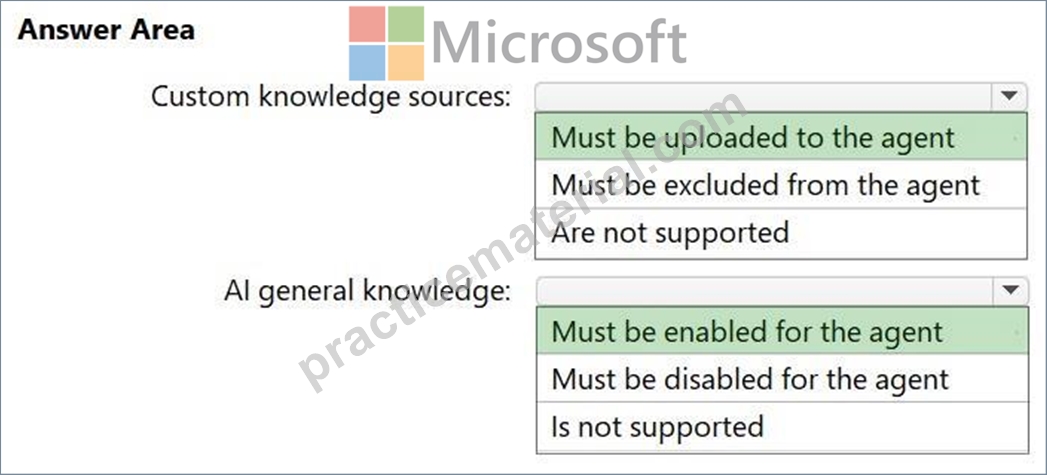
Explanation:
Box 1: Must be uploaded to the agent
Custom knowledge sources
Box 2: Must be enabled for the agent
AI general knowledge
To implement a generative AI agent for in-app help in Dynamics 365 Finance and Operations while minimizing inaccuracies, you must configure the agent in Microsoft Copilot Studio by uploading specific knowledge sources and enabling general AI knowledge.
1. Upload Custom Knowledge Sources
To ensure the agent provides accurate, organization-specific guidance, upload your internal documentation directly to the agent
2. Enable General AI Knowledge
To allow the agent to use its own broad generative AI knowledge for general inquiries:
Open Microsoft Copilot Studio and select the Dataverse environment linked to your Finance and Operations apps.
Navigate to Agents and open the specific agent named Copilot for finance and operations apps.
On the Overview tab, find the Knowledge section and set Allow the AI to use its own general knowledge to Enabled.
Publish the changes to make this capability available in the D365 F&O sidecar.
Reference:
https://arpideas.com/en/articles/knowledge-hub/building-smart-ai-agents-with-microsoft-copilot- studio
NEW QUESTION # 48
A company uses Microsoft Dynamics 365 Sales to manage leads that are stored in a Microsoft Dataverse table named Lead and use non-standard terminology and custom columns.
You need to configure business terms in the Lead table so that Microsoft Copilot controls can summarize the leads efficiently. The solution must minimize administrative effort.
How should you configure the business terms?
- A. Create new business terms for each field.
- B. Add the schema names as business terms.
- C. Map the field display names as business terms.
- D. Combine all the fields into one custom field.
Answer: C
Explanation:
To configure Microsoft Copilot to efficiently summarize leads with non-standard terminology and custom columns in Microsoft Dynamics 365 Sales, you must map these unique fields to business terms within the Sales AI Glossary in Microsoft Copilot Studio.
Note:
To map your field display names as business terms:
1. Access Copilot Studio: Open Microsoft Copilot Studio and select the environment containing your Dynamics 365 Sales instance.
2. Select the Sales Agent: Navigate to Agents and select the agent named Copilot in Dynamics
365 Sales (formerly Sales Copilot Power Virtual Agents Bot).
3. Navigate to Knowledge: Under the Knowledge section, select the SalesSpecificQnA knowledge source.
4. Add Glossary Entries:
Go to the Glossary tab.
Term: Enter the non-standard or custom field display name (e.g., your custom business term).
Description: Define how this term relates to the Dataverse schema. This helps Copilot understand the logic behind the custom column.
5. Configure Synonyms: In the Synonyms section, map your custom field to alternative names that sellers might use in natural language queries (e.g., mapping "Custom Revenue" to
"Opportunity Revenue").
6. Publish Changes: Select Publish to apply these mappings, allowing Copilot to use the newly defined terms when generating lead summaries.
Reference:
https://learn.microsoft.com/en-us/dynamics365/sales/extend-copilot-chat
NEW QUESTION # 49
......
We offers you the latest free online AB-100 dumps to practice: https://www.practicematerial.com/AB-100-exam-materials.html
Microsoft AB-100 Real Exam Questions Guaranteed Updated Dump: https://drive.google.com/open?id=18Us0Ey-0RrzUh6DGI7D6e5detTf1bFVj
