

Free UiPath-ADPv1 Sample Questions and 100% Cover Real Exam Questions (Updated 188 Questions)
Download Real UiPath UiPath-ADPv1 Exam Dumps Test Engine Exam Questions
NEW QUESTION # 16
A developer is building a process that types data into input fields using the Hardware Events input method.
Which property of the Type Into activity should be modified to reduce the pace at which the input string characters are typed into the fields?
- A. Delay between keys
- B. Delay after
- C. Delay before
- D. Alter disabled element
Answer: A
Explanation:
To reduce the pace at which the input string characters are typed into the fields using the Hardware Events input method, the developer should modify the Delay between keys property of the Type Into activity. This property specifies the delay time (in milliseconds) between two keystrokes. The default value is 10 milliseconds. The maximum value is 1000 milliseconds. By increasing the value of this property, the developer can slow down the typing speed and avoid any errors or missed characters. For example, if the developer sets the Delay between keys property to 100 milliseconds, the activity will wait for 0.1 seconds before typing each character of the input string. References: [Type Into], [Delay Between Keys]
NEW QUESTION # 17
A developer plans to build an automation process using the REFramework with Orchestrator queues. Based on UiPath best practice, what is the recommended sequence of steps to update the template and create/update Queues and Values?
Instructions: Drag the Description found on the left and drop on the correct Step Sequence found on the right.
Answer:
Explanation:
Explanation:
A screenshot of a computer program Description automatically generated
To align with UiPath's best practices when updating the REFramework template for use with Orchestrator queues, the sequence of steps should ensure proper setup of the queues in Orchestrator, configuration of the project to interact with these queues, and implementation of the business logic to process items from the queues.
Here's how the steps should be sequenced:
Step 1: Create the queue in Orchestrator and set its Auto Retry value as required by the process documentation.This step ensures that the queue is available in Orchestrator with the correct settings before the automation attempts to interact with it.
Step 2: Edit the project's configuration file (Data/Config.xlsx) and configure parameters OrchestratorQueueName and OrchestratorQueueFolder.Once the queue is created, the next step is to ensure that the automation project is configured to reference the correct queue and folder within Orchestrator.
Step 3: Edit GetTransactionData.xaml workflow and assign a proper value for the out_TransactionID argument.This configuration allows the workflow to correctly fetch transaction items from the Orchestrator queue for processing.
Step 4: Edit workflow Process.xaml and implement the logic to process each TransactionItem.Finally, the core processing logic that operates on each queue item is implemented, allowing the automation to perform the necessary actions for each transaction.
NEW QUESTION # 18
Consider testing a workflow that computes the sum of two numbers having the data driven test data from the Excel file below:
Expanding the functionality of the workflow to compute the sum of three numbers, the data needs to be updated as well to accommodate the new scenario:
What are steps to do that?
- A. Click Right on the Test Case and select Add Test Data.
- B. Click Right on the Test Case and select Remove Test Data.
- C. Click Right on the Test Case and select Update Test Data
- D. Click Right on the Test Case and select Refresh Test Data
Answer: D
NEW QUESTION # 19
What do the percentages from the Test Explorer panel represent?
- A. Percent of test data run.
- B. Coverage percent.
- C. Passing percent.
- D. Correctness of the code percent.
Answer: C
Explanation:
The percentages from the Test Explorer panel represent the passing percent of the test cases that are executed.
The Test Explorer panel shows the status of each test case, the total number of test cases, the number of passed test cases, the number of failed test cases, and the passing percent. The passing percent is calculated by dividing the number of passed test cases by the total number of test cases and multiplying by 100. For example, if there are 10 test cases and 8 of them pass, the passing percent is 80%. References: Test Explorer
NEW QUESTION # 20
Which major sections can be added or modified in the State activity of a UiPath project that uses State Machines?
- A. Entry actions. Exit actions, Conditional expressions, and Transitions.
- B. Entry actions. Exit actions, Trigger conditions, and Transitions.
- C. Entry actions, Exit actions, Guard conditions, and Transitions.
- D. Entry actions, Exit actions, Guard and Trigger attributes, and Transitions.
Answer: C
Explanation:
The State activity is a container for using State Machine specific activities. It can be added or modified in the State Machine activity, which is a type of automation that uses a finite number of states in its execution1. The State activity contains three major sections: Entry, Exit, and Transition(s)2.
The Entry section enables the user to add entry actions for the selected state, which are executed when the state is entered.
The Exit section enables the user to add exit actions for the selected state, which are executed when the state is exited.
The Transition(s) section displays all the transitions linked to the selected state, which are represented by arrows or branches between states. Each transition can be expanded to view or edit its three subsections: Trigger, Condition, and Action2.
The Trigger subsection enables the user to add a trigger for the next state, which is an activity that initiates the transition.
The Condition subsection enables the user to add a guard condition for the transition, which is a Boolean expression that must be true for the transition to occur.
The Action subsection enables the user to add an action for the transition, which is an activity or sequence that is executed before the transition occurs.
Option D is the correct answer, as it lists the major sections that can be added or modified in the State activity of a UiPath project that uses State Machines. Option A is incorrect, as there is no Conditional expressions section in the State activity. Option B is incorrect, as there are no Guard and Trigger attributes sections in the State activity, but rather subsections in the Transition(s) section. Option C is incorrect, as there is no Trigger conditions section in the State activity, but rather a subsection in the Transition(s) section.
References: 1: State Machine 2: State
NEW QUESTION # 21
The following table is stored in a variable called "dt".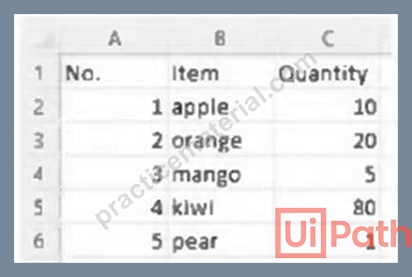
What will the value of the qty variable be after executing the Assign activity?
- A. 0
- B. null
- C. 1
- D. 2
Answer: A
NEW QUESTION # 22
Data from an Excel file is read into a data table named "dtEmployee", as displayed in the following graphic: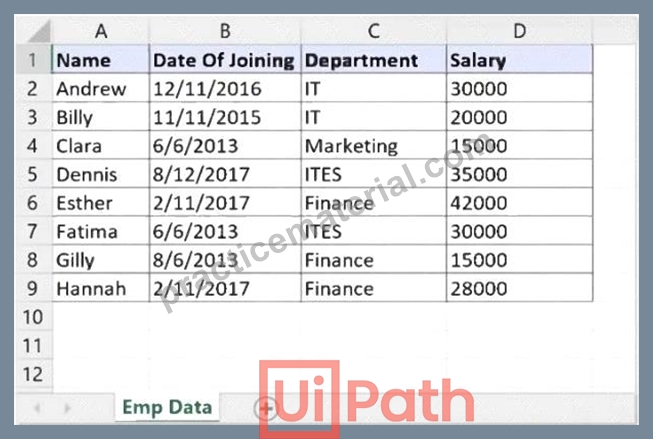
A developer needs to filter the data table to obtain all rows representing employees from the Finance and IT departments with a Salary under 30,000. Which expression yields the desired outcomes?
- A. dtEmployee.Select("([Department]='IT' OR [Department]='Finance') AND [Salary] < 30000")
- B. dtEmployee.Select("[Department]='IT' OR [Department]= 'Finance' AND [Salary] < 30000")
- C. dtEmployee.Select("([Department]='IT' AND [Department]='Finance') AND [Salary] < 30000")
- D. dtEmployee.Select("[Department]='IT OR [Department]='Finance' OR [Salary] < 30000")
Answer: A
NEW QUESTION # 23
A developer creates a process that uses data from multiple sources and uploads it to an Orchestrator queue.
The data originates from emails in different email inboxes and needs to be processed in the same order in which the email was received. To ensure the Queue Items are processed in the correct order, which property of the Add Queue Item activity should be used?
- A. Reference
- B. Deadline
- C. Postpone
- D. Itemlnformation
Answer: C
Explanation:
To ensure the Queue Items are processed in the correct order, the Postpone property of the Add Queue Item activity should be used. The Postpone property allows you to specify the date and time after which the queue item can be processed. This property can be used to prioritize the queue items based on the order of the emails received. For example, if the email was received at 10:00 AM, the Postpone property can be set to 10:00 AM or later, so that the queue item will not be processed before that time. The Postpone property can be set to a DateTime value, a variable, or an expression that returns a DateTime value. For example, the following expression sets the Postpone property to the current date and time plus one hour:
VB DateTime.Now.AddHours(1)
NEW QUESTION # 24
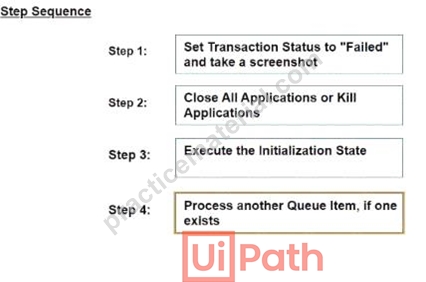
What is the correct sequence of steps in a REFramework project that is linked to Orchestrator it an application exception occurs on a Queue Item m the Process Transaction stale?
Instructions: Drag the Description found on the "Left" and drop on the correct Step Sequence found on the Right".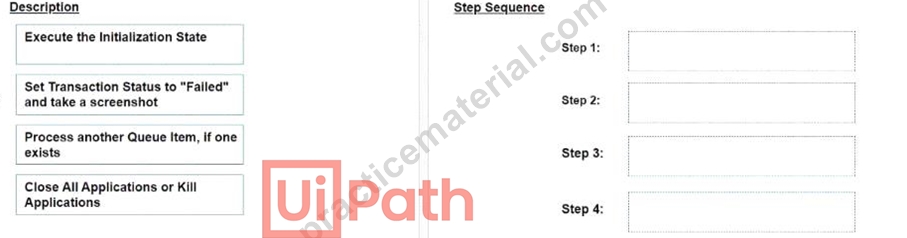
Answer:
Explanation:
NEW QUESTION # 25
A developer implemented a process using the Robotic Enterprise Framework and an Orchestrator queue. The MaxRetryNumber from the "Config.xlsx" file is set to "1" and the Max # of retries from the Queue settings from Orchestrator is set to "2". At runtime, the first transaction item throws a Business Exception.
How many times will the transaction be retried?
- A. The transaction will be retried only one time.
- B. The transaction will be retried multiple times, until it will be processed successfully.
- C. The transaction will be retried 2 times.
- D. The transaction will not be retried.
Answer: A
NEW QUESTION # 26
What role do Triggers play in the UiPath Integration Service?
- A. Provide a mechanism for starting processes on a scheduled basis from Orchestrator.
- B. Provide a mechanism for subscribing to specific events from third-party applications, automatically starting processes in Orchestrator.
- C. Assist in the creation of automation projects by providing event-based activities.
- D. Manage connections between UiPath Studio and third-party applications.
Answer: B
NEW QUESTION # 27
Data from an Excel file is read into a data table named "dtEmployee", as displayed in the following graphic: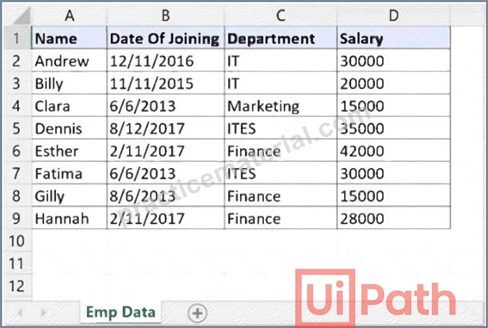
A developer needs to filter the data table to obtain all rows representing employees from the Finance and IT departments with a Salary under 30,000. Which expression yields the desired outcomes?
- A. dtEmployee.Select("([Department]='IT' OR [Department]='Finance') AND [Salary] < 30000")
- B. dtEmployee.Select("[Department]='IT' OR [Department]= 'Finance' AND [Salary] < 30000")
- C. dtEmployee.Select("([Department]='IT' AND [Department]='Finance') AND [Salary] < 30000")
- D. dtEmployee.Select("[Department]='IT OR [Department]='Finance' OR [Salary] < 30000")
Answer: A
NEW QUESTION # 28
What is the purpose of the Invoke Code activity in UiPath?
- A. Invokes VB MET code optionally passing it a list of input arguments
- B. Invokes Java code, optionally passing it a list of input arguments.
- C. Invokes VB MET or Java code optionally passing it a list of input arguments
- D. Invokes VB.NET or C# code, optionally passing il a list of input arguments.
Answer: D
Explanation:
The purpose of the Invoke Code activity in UiPath is to invoke VB.NET or C# code, optionally passing it a list of input arguments. The Invoke Code activity allows the developer to write and execute custom code in VB.NET or C# within a UiPath workflow. The Invoke Code activity has a Code property, where the developer can enter the code to be executed. The Invoke Code activity also has an Arguments property, where the developer can specify the input and output arguments for the code. The Invoke Code activity can be useful for performing complex calculations, manipulating data, or integrating with external libraries or applications that are not supported by the existing UiPath activities. References: [Invoke Code]
NEW QUESTION # 29
A developer has created a variable of type String called "MyNumbers" and assigned to it the following value:
"1. 2, 3.4, 5. 6". What is the resulting data type for the expression MyNumbers.Split("."c)(1)?
- A. String
- B. Double
- C. lnt32
- D. Array of String
Answer: A
Explanation:
When the Split method is used on a String variable, the result is an array of substrings. However, accessing a specific element of this array (e.g., MyNumbers.Split("."c)(1)) returns a single substring, which is a String.
NEW QUESTION # 30
When a developer runs a process using the REFramework, with the process utilizing Orchestrator queues and a queue already created with the Name provided and the Auto Retry function disabled, which states will be executed without errors?
- A. Initialization -> Process Transaction -> End Process
- B. Initialization -> Get Transaction Data -> End Process
- C. Initialization -> Get Transaction Data -> Process Transaction -> End Process
- D. Initialization -> End Process
Answer: C
Explanation:
The states that will be executed without errors when a developer runs a process using the REFramework, with the process utilizing Orchestrator queues and a queue already created with the Name provided and the Auto Retry function disabled, are Initialization, Get Transaction Data, Process Transaction, and End Process. The REFramework is a template that provides a robust and scalable structure for building automation processes.
The REFramework consists of four main states: Initialization, Get Transaction Data, Process Transaction, and End Process. The Initialization state is responsible for initializing the application, reading the configuration file, and logging in to the Orchestrator. The Get Transaction Data state is responsible for fetching the next transaction item from the Orchestrator queue and assigning it to the TransactionItem variable. The Process Transaction state is responsible for executing the main logic of the process for the current transaction item.
The End Process state is responsible for closing the application, logging out of the Orchestrator, and performing any cleanup actions. If the process utilizes Orchestrator queues and a queue already exists with the Name provided and the Auto Retry function disabled, then the process will be able to execute these states without errors, assuming that there are no other issues or exceptions in the workflow. References: [Robotic Enterprise Framework], [REFramework States]
NEW QUESTION # 31
A developer creates a process that uses data from multiple sources and uploads it to an Orchestrator queue. The data originates from emails in different email inboxes and needs to be processed in the same order in which the email was received. To ensure the Queue Items are processed in the correct order, which property of the Add Queue Item activity should be used?
- A. Reference
- B. Deadline
- C. Postpone
- D. Itemlnformation
Answer: C
NEW QUESTION # 32
What is the default URL of the OCR server that runs the Computer Vision service?
- A. https://cvserver.uipath.com/
- B. https://server.uipath.com/
- C. https://cv.uipath.com/
- D. https://computervision.uipath.com/
Answer: C
Explanation:
The default URL of the OCR server that runs the Computer Vision service is https://cv.uipath.com/. The Computer Vision service is a cloud-based service that provides OCR and AI capabilities for UiPath automation projects. The service can be accessed by using the Computer Vision activities in UiPath Studio, such as CV Screen Scope, CV Click, CV Type Into, and more. The service requires an API key and a URL to connect to the OCR server. The default URL is https://cv.uipath.com/, but it can be changed to a custom URL if the developer has a self-hosted OCR server. The API key can be obtained from the UiPath Automation Cloud portal or from the UiPath Marketplace. References: [About Computer Vision], [Computer Vision Activities]
NEW QUESTION # 33
A developer wants to add items to a list of strings using the Invoke Method activity. The list is declared as follows:
The Invoke Method activity has the following properties:
The Parameters property is as follows:
Based on the information shown in the exhibits what is the outcome of the Invoke Method activity?
- A. Colors will contain an item with an empty value.
- B. An exception will be thrown.
- C. Colors will contain an item with the value "Colors: Yellow".
- D. Colors will contain an item with the value "Yellow".
Answer: D
NEW QUESTION # 34
Which activity Is specific tor Ul synchronization in UlPath Studio?
- A. Process Start Trigger
- B. Check App State
- C. Get Processes
- D. Use Applicationy/Browser
Answer: B
Explanation:
The Check App State activity is specifically designed for UI synchronization. It checks the state of a UI element, ensuring that subsequent actions are performed when the UI element is in the desired state.
NEW QUESTION # 35
Which are the actions that can be done in Test Explorer?
- A. Export test data, group tests together, analyze activity coverage.
- B. Export test results, group tests together, analyze activity coverage.
- C. Perform debugging, analyze activity coverage, group tests together.
- D. Export test data, perform debugging, analyze activity coverage.
Answer: B
Explanation:
Test Explorer is a panel that shows information relevant to test automation in UiPath Studio. You can use Test Explorer and its sub-panels to perform various actions, such as1:
Export test results: You can export the test results shown in the Test Results panel to a JSON or HTML file, which can be used for further analysis or reporting.
Group tests together: You can group tests together based on different criteria, such as test type, test status, test suite, etc. This helps you organize and filter the tests in the Test Explorer panel.
Analyze activity coverage: You can analyze the activity coverage of your test cases by using the Activity Coverage panel, which shows the percentage of activities that have been executed during the test run. You can also filter the activities by covered or uncovered in the Designer panel.
The other options are not actions that can be done in Test Explorer, because they either involve features that are not part of Test Explorer, or they are not related to test automation. For example:
Option A is incorrect, because Test Explorer does not have a feature to export test data, but only test results. Test data can be generated or managed by using other activities, such as Generate Test Data or Test Data Queue.
Option B is incorrect, because Test Explorer does not have a feature to perform debugging, but only to run or retry tests. Debugging can be done by using the Debug tab in Studio, which allows you to set breakpoints, inspect variables, and step through the workflow.
Option D is incorrect, because Test Explorer does not have a feature to export test data, but only test results. Test data can be generated or managed by using other activities, such as Generate Test Data or Test Data Queue.
References:
1: Studio - Test Explorer - UiPath Documentation Portal
NEW QUESTION # 36
......
New UiPath-ADPv1 exam dumps Use Updated UiPath Exam: https://www.practicematerial.com/UiPath-ADPv1-exam-materials.html
Verified UiPath-ADPv1 Dumps Q&As - UiPath-ADPv1 Test Engine with Correct Answers: https://drive.google.com/open?id=18CsvbrVhMyjTNodHnQlFxC5eerLK8qIa
